
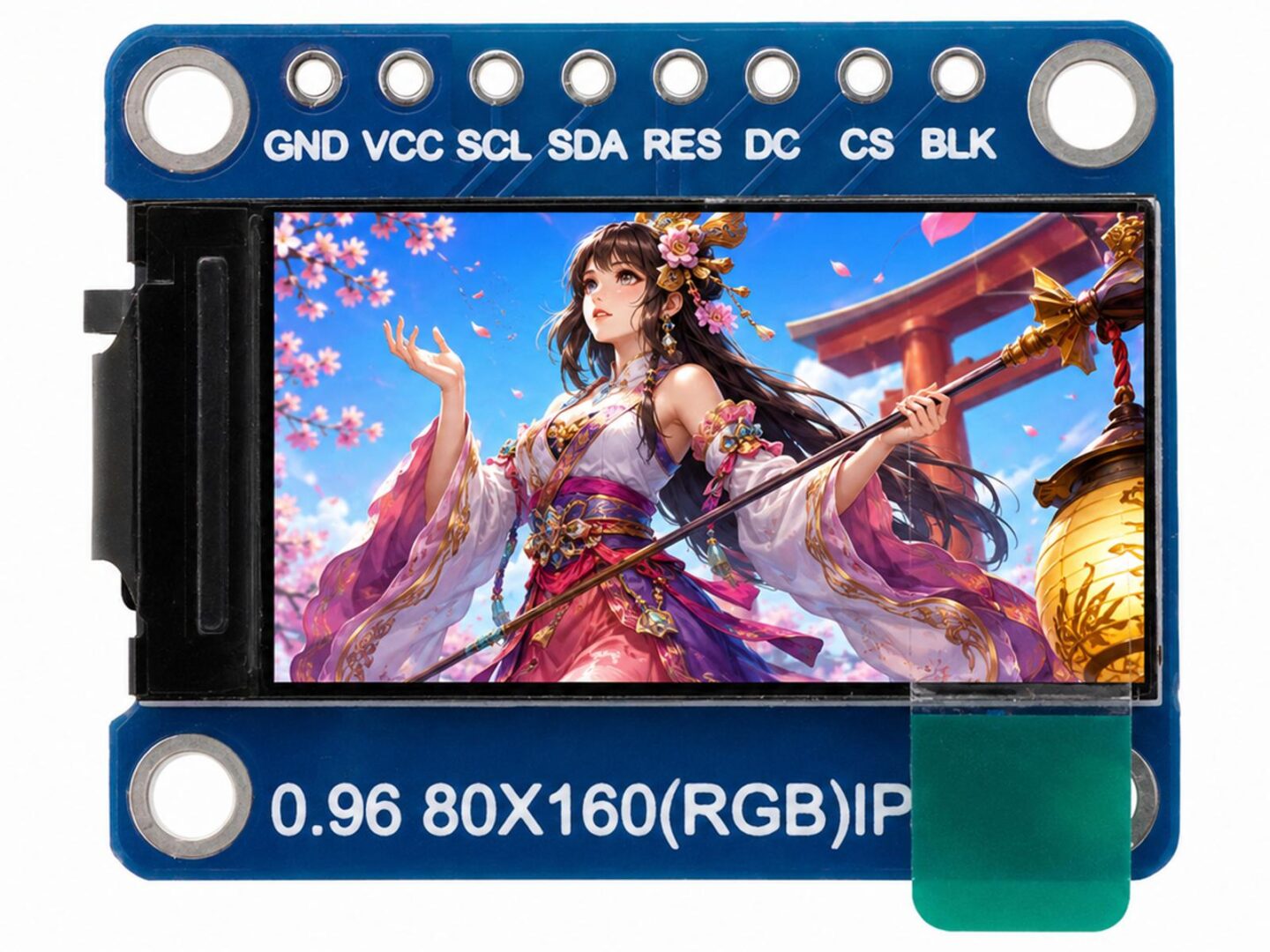
This 0.96 inch IPS TFT display module is a compact full-color graphic display for microcontroller and embedded projects. It provides an 80 x 160 pixel RGB display area and uses the ST7735S display driver IC with an SPI interface.
The module is suitable for Arduino, ESP32, ESP8266, RP2040, STM32, Raspberry Pi Pico, and other 3.3V microcontroller platforms. It is useful for compact user interfaces, status displays, menus, sensor readouts, small graphics, icons, and portable electronics projects where a small but sharp color display is required.
The display uses a normally black IPS panel, which provides strong contrast and a wide viewing angle compared with many simple low-cost TFT displays. The SPI interface keeps the required number of control pins low while still allowing fast screen updates for small graphics and text.
Typical applications
- Arduino and ESP32 display projects
- Raspberry Pi Pico and RP2040 user interfaces
- Small sensor dashboards
- Portable instruments and handheld devices
- Battery-powered electronics projects
- Status displays for embedded systems
- Menus, icons, and graphical user interfaces
- Small clocks, counters, meters, and information screens
- DIY electronics, education, and prototyping
Key features
- 0.96-inch full-color TFT display module
- 80 x 160 pixel RGB resolution
- Normally black IPS display panel
- ST7735S display driver IC
- SPI interface
- 3.3V power and logic operation
- Compact PCB module with mounting holes
- Backlight control pin
- Suitable for text, graphics, icons, and simple user interfaces
- Supported by common Arduino display libraries
- Works with many 3.3V microcontroller boards
Technical specifications
| Display size | 0.96 inch |
| Display type | IPS TFT LCD |
| Display mode | Normally black |
| Display format | Graphic 80RGB x 160 dot-matrix |
| Resolution | 80 x 160 pixels |
| Driver IC | ST7735S |
| Interface | SPI |
| Power supply | 3.3V |
| Outline dimensions | 24 x 30 x 2.8mm |
| Active display area | 10.8 x 21.7mm |
| Dot pitch | 0.135 x 0.136mm |
| Operating temperature | -20 to 70°C |
| Backlight control | BLK pin |
Pin description
| Pin | Name | Description |
| 1 | GND | Ground |
| 2 | VCC | 3.3V power input |
| 3 | SCL | SPI serial clock input |
| 4 | SDA | SPI serial data input, usually connected to MOSI |
| 5 | RES | Display reset input. Pull low to reset the display controller. Keep high during normal operation. |
| 6 | DC | Data / command selection input |
| 7 | CS | SPI chip select input |
| 8 | BLK | Backlight control input |
SPI signal notes
- The pin names SCL and SDA on this module refer to SPI clock and SPI data, not I2C.
- SCL connects to the SPI clock signal.
- SDA connects to the SPI MOSI signal from the controller.
- The module does not use a MISO output for normal display operation.
- CS, DC, and RES are control signals and are usually connected to regular GPIO pins.
- BLK can be connected to 3.3V for always-on backlight operation or to a PWM-capable GPIO for software brightness control.
Library and software support for 0.96 inch IPS TFT Display
- The ST7735S controller is supported by widely used Arduino display libraries.
- Adafruit ST7735 / ST7789 library support is commonly used together with Adafruit GFX for graphics, text, lines, rectangles, circles, bitmaps, and fonts.
- TFT_eSPI is a popular option for ESP32, ESP8266, RP2040, and STM32 projects and supports many ST7735-based SPI TFT displays.
- Other graphics libraries, including Arduino_GFX, may also support ST7735-based displays depending on board and configuration.
- Library configuration may require selecting the ST7735 driver, 80 x 160 resolution, correct rotation, RGB / BGR color order, and possible display offset values.
- Because different ST7735 display modules can use slightly different panel offsets, the first test may require adjusting width, height, rotation, color order, or start offset in software.
Memory and performance notes
- An 80 x 160 display contains 12,800 pixels.
- A full 16-bit color framebuffer would require about 25.6KB of RAM.
- Many Arduino graphics libraries can draw directly to the display without requiring a full framebuffer.
- Small displays like this are well suited for microcontrollers with limited memory.
- SPI speed, wiring length, and library configuration can affect update speed and display reliability.
Basic connection overview
| Display pin | Typical controller connection |
| GND | Ground |
| VCC | 3.3V |
| SCL | SPI SCK |
| SDA | SPI MOSI |
| RES | GPIO for reset |
| DC | GPIO for data / command selection |
| CS | SPI chip select or GPIO |
| BLK | 3.3V or PWM-capable GPIO for backlight control |
Important notes
- This is a 3.3V display module. Do not connect the power input directly to 5V unless your specific module version is confirmed to include suitable regulation and level shifting.
- The SPI data and control pins should be driven with 3.3V logic.
- The display is not an I2C display, even though the data pin is marked SDA.
- The backlight is controlled separately through the BLK pin.
- The exact software initialization may vary slightly depending on the library and display panel variant.
- For ESP32 and RP2040 projects, TFT_eSPI is often a good choice for better performance.
- For general Arduino projects, Adafruit ST7735 together with Adafruit GFX is a common starting point.

Reviews
There are no reviews yet.