


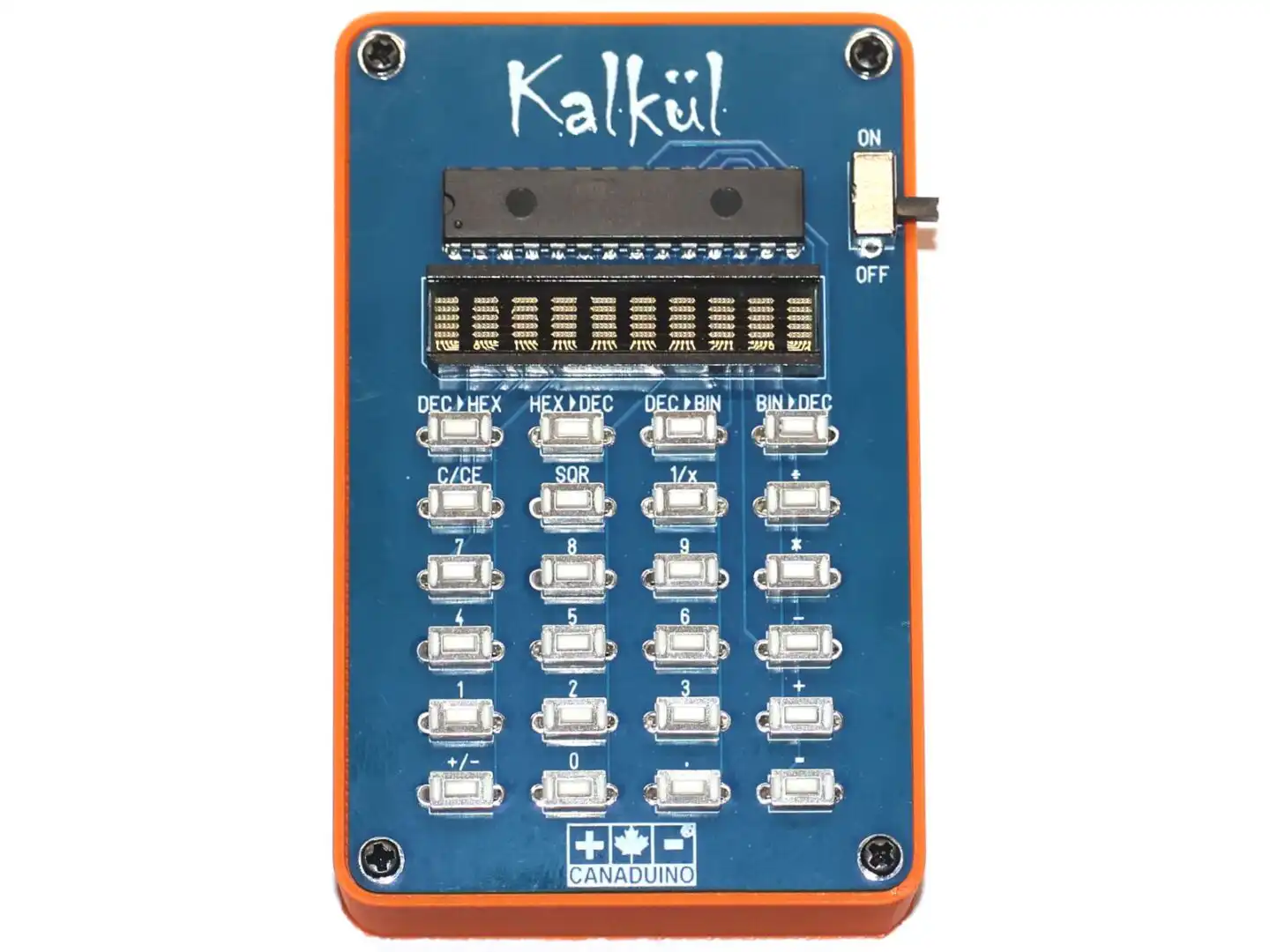
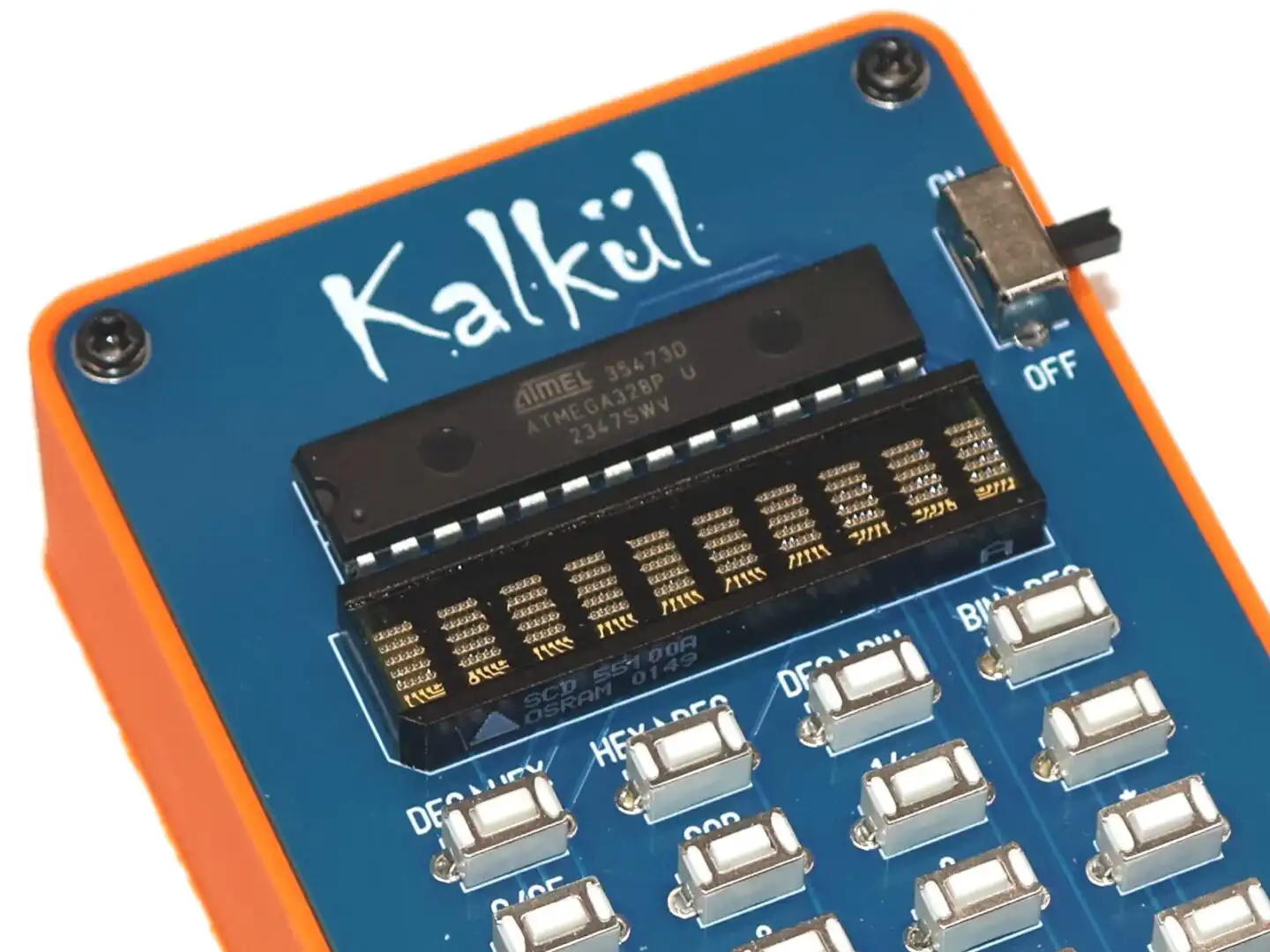


The Arduino Pocket Calculator DIY Kit by CANADUINO combines a vintage 10-digit 5×5 LED matrix display with an ATmega328P microcontroller to create a functional educational tool. The kit includes pre-assembled surface-mount components and requires through-hole component assembly by the customer. Pre-loaded firmware provides immediate functionality, while complete source code enables customization and learning.
A 3D printed enclosure and its design file (.STL) are also available.
Arithmetic Operations
Basic operations: Addition, subtraction, multiplication, division
Advanced functions: Square root, reciprocal (1/x)
Floating point support with up to 6 decimal places
Signed number support (positive and negative values)
Operation chaining (sequential calculations without clearing)
Error handling for division by zero and mathematical errors
Number System Modes
Decimal Mode: Standard base-10 calculations with floating point support
Hexadecimal Mode: Base-16 display and input (0-9, A-F)
Binary Mode: Base-2 display and input (0-1)
Real-time conversion between number systems
Hexadecimal letter entry via long-press key detection (500ms threshold)
Display Characteristics
10-digit capacity
Right-aligned numerical display
Overflow detection and indication
Seven adjustable brightness levels (6% to 100%, adjustable in source code)
Custom startup message (modifiable in source code)
Technical Specifications
Model: ATmega328P-PU
Clock: 8MHz internal oscillator
Operating voltage: 4.0V - 5.5V
Programming interface: ICSP header (pre-installed)
Display
Model: SCD55100A (Osram/Siemens)
Configuration: 10 digits, 5×5 LED dot matrix per digit
Colors available: Red (SCD55100A), Yellow (SCD55101A), Green (SCD55103A)
Interface: 3-wire serial + reset
Brightness levels: 7 programmable settings
Input Interface
24-key tactile button matrix
Configuration: 6 rows × 4 columns
Scanning method: Software matrix scanning with debounce
Long-press detection: 500ms threshold for special functions
Power System
Power source: 3× AA batteries (not included)
Nominal voltage: 4.5V
Operating range: 4.0V - 5.5V
Power switch: Slide switch included
PCB Specifications
Pre-assembled SMD components (1206 package)
Through-hole component assembly required
ICSP programming header installed
Power Consumption
Current draw varies with display brightness setting:
Default operation (40% brightness): approximately 60mA
Low power mode (20% brightness): approximately 40mA
Maximum brightness (100%): approximately 150mA
Minimum brightness (6%): approximately 20mA
Battery Life Estimates (2500mAh AA batteries):
Continuous operation at 40% brightness: approximately 40 hours
Continuous operation at 20% brightness: approximately 60 hours
Typical intermittent use: several weeks to months
Components Requiring Assembly
ATmega328P-PU microcontroller (pre-programmed)
SCD55100A LED display module
24 tactile push buttons
Power slide switch
3× AA battery holder with wire leads - watch polarity!!
2 DIP28 IC sockets (optional use)
Digital Resources
Arduino source code V1.6 with comprehensive comments (download)
SCD55100A display library (download)
SCD55100A library documentation (download)
3D printer STL file for enclosure (download)
Schematic diagram (download)
!! Not Included !!
3× AA batteries (alkaline recommended)
3D printed enclosure (available HERE)
Assembly Requirements
Skill Level: Beginner to intermediate soldering experience recommended
Assembly Process
Solder 24 tactile buttons to PCB
Install power switch
Install LED display (direct solder or socket)
Install microcontroller (direct solder or socket)
Attach battery holder wire leads: red to [+] and black to [-]
Install batteries and test functionality
Optional: Install in 3D printed enclosure
Note on IC Sockets:
Two DIP28 sockets are included for component removal convenience. However, direct soldering is recommended for permanent installations. IC sockets can develop contact resistance issues over time, affecting reliability.
Complete calculator logic:
- Matrix keypad scanning with debounce
- Long-press detection for hexadecimal letters
- Display optimization for minimal current consumption
- Base conversion algorithms
- Error handling and overflow detection
Arduino source code with educational comments explaining:
- Keypad matrix scanning implementation
- State machine architecture
- Number base conversion algorithms
- Display multiplexing and optimization
- Long-press detection logic
- Memory management strategies
Code Customization Options (examples):
- Adjust display brightness levels
- Modify startup message
- Add mathematical functions
- Implement additional number bases
- Customize key mappings
- Add memory storage functions
3D Printed Enclosure
- A professional enclosure design is available for download in STL format.
Educational Value / Learning Objectives:
- Understanding embedded programming concepts
- Binary, hexadecimal, and decimal number systems
- Through-hole soldering techniques
- Matrix keyboard scanning algorithms
- Display multiplexing and control
- State machine implementation
- Firmware development and debugging
Arduino Library for SCD55100A display:
- We developed an easy to use library that is available for download.
Warranty and Support
The provided firmware and source code are offered for educational purposes without warranty. The code may contain errors or bugs. Users are encouraged to review, understand, and modify the code as needed. Software updates and corrections will be made available as issues are identified.
The Arduino Pocket Calculator DIY Kit Includes:
1 x PCB assembly with pre-installed SMD components
1 x ATmega328P-PU (pre-programmed)
1 x SCD55100A LED display
24 x Tactile push buttons
1 x Power slide switch
1 x Battery holder (3× AA)
2 x DIP28 IC sockets
4 x Mounting screws
Reviews
There are no reviews yet.